Studio Designer vs Design Manager: which studios should pick
By Faura ·

Studio Designer suits firms that need item-level procurement and integrated accounting under one roof; Design Manager suits mid-size firms wanting pre-loaded vendor catalogues and a standalone general ledger. The dominant differentiator between them isn’t interface polish. It’s accounting architecture, procurement depth, and how much your studio’s growth depends on tracking every specified item from purchase order to final invoice.
Before you shortlist either platform, weigh these criteria:
- Procurement volume — how many items, vendors, and purchase orders move through your studio each month.
- Accounting autonomy — whether you need a full general ledger inside the platform or you’re happy syncing to QuickBooks or Xero, and whether it supports UK VAT, GBP and Making Tax Digital.
- Team size and growth trajectory — per-seat pricing behaves very differently at 3 people versus 15.
Key Takeaways
Studio Designer and Design Manager both replace QuickBooks or Xero as the accounting system of record, while procurement volume and seat pricing should drive the final decision.
| Point | Details |
|---|---|
| Match tool to procurement volume | High-volume procurement favours Studio Designer or Design Manager over lighter, design-focused tools. |
| Accounting depth decides the tier | Studio Designer and Design Manager both include a general ledger, reducing the need to export to QuickBooks. |
| Model seat pricing at future headcount | Per-seat costs compound as headcount grows, so price for growth, not today. |
| Demo before you decide | Ask vendors to build a live purchase order and profit-and-loss report during the demo itself. |
| Faura supports the sourcing side | Faura’s trade showroom helps studios validate procurement workflows once software is chosen. |
Table of Contents
- Studio designer vs design manager: the core comparison
- Where each platform pulls ahead on features
- How much does each platform actually cost?
- Do these platforms replace QuickBooks or Xero?
- Which platform fits your studio’s size and workflow?
- What do reviewers actually say about these tools?
- How to choose: a checklist for vendor demos
- How does a trade showroom evaluate these platforms?
- Final recommendation: which one should you book a demo for?
- Can you customise workflows, templates and reports?
- How do their data security and privacy policies compare?
- Do Studio Designer and Design Manager have mobile apps?
- Frequently asked questions
- Sources
Studio designer vs design manager: the core comparison
Both platforms grew up serving the same niche: interior designers who need procurement and accounting in one system, not bolted together from a project tool and a spreadsheet. Studio Designer leans into item-level project management with accounting built natively into the platform, according to its official product description. Design Manager has a longer trade history and is often shortlisted specifically because it ships with pre-loaded vendor catalogues, a point Knowlix makes explicitly when comparing procurement-heavy alternatives.
| Platform | Best for | Accounting depth | Pricing shape | Integrations | Support & onboarding |
|---|---|---|---|---|---|
| Studio Designer | Firms needing item-level procurement plus native accounting | Full general ledger, AR/AP, accruals | Tiered by seats/features | QuickBooks export options | Paid onboarding tiers |
| Design Manager | Mid-size firms wanting pre-loaded vendor catalogues | Standalone general ledger | Tiered by seats | QuickBooks sync | Structured training packages |
| Mydoma (Mydoma Studio) | Smaller studios prioritising presentations | Limited; pairs with external accounting | Lower entry tiers | Limited native accounting sync | Self-serve plus support tickets |
| DesignFiles | Small studios wanting simpler UI | Basic | Lower entry tiers | Third-party accounting exports | Lightweight onboarding |
| Houzz Pro | Designers relying on marketplace leads | Basic to moderate | Tiered, lead tools bundled | Payment processor integrations | Standard support hours |
The single row worth staring at longest is accounting depth. If your studio still exports to QuickBooks every month because neither system gives you a trustworthy profit-and-loss by project, you’re paying twice: once for the software, once in bookkeeping hours. Studio Designer and Design Manager both aim to remove that second cost; the others mostly don’t try.
Where each platform pulls ahead on features
Project and task management look similar on the surface across most of these tools, but the interior-design-specific detail is where they diverge. Studio Designer structures tasks around specified items, so a task can be tied directly to a piece of furniture moving from quote to purchase order to delivery. Design Manager takes a comparable item-first approach but leans harder on its vendor catalogue, letting you pull specification data without rebuilding it from scratch, a workflow Design Manager reviewers on G2 consistently cite as a time-saver.
Order and purchase order handling is where the gap with generic tools widens. Neither Monday.com, Asana, ClickUp, nor Notion was built with vendor catalogues or item-level procurement in mind. They’re excellent for task boards and internal collaboration, but a studio using them for purchase orders is usually running a parallel spreadsheet for the actual accounting.
Accounting depth separates the category cleanly:
- Studio Designer and Design Manager both support full general ledger functionality, meaning you can generate a profit-and-loss by project without leaving the platform.
- DesignFiles, Mydoma, HoneyBook, and Ivy handle invoicing but generally still route serious bookkeeping through QuickBooks or Xero.
- Houzz Pro’s accounting sits closer to invoicing and payments than full ledger work.
Design tools and client-facing presentation features tip the balance the other way. Mydoma and DesignFiles offer stronger moodboard and presentation workflows out of the box, which is exactly why some studios run two subscriptions rather than one.
How much does each platform actually cost?
Pricing tiers across this category typically gate accounting depth and procurement features behind higher-cost plans, so the entry price rarely reflects what a working studio ends up paying.
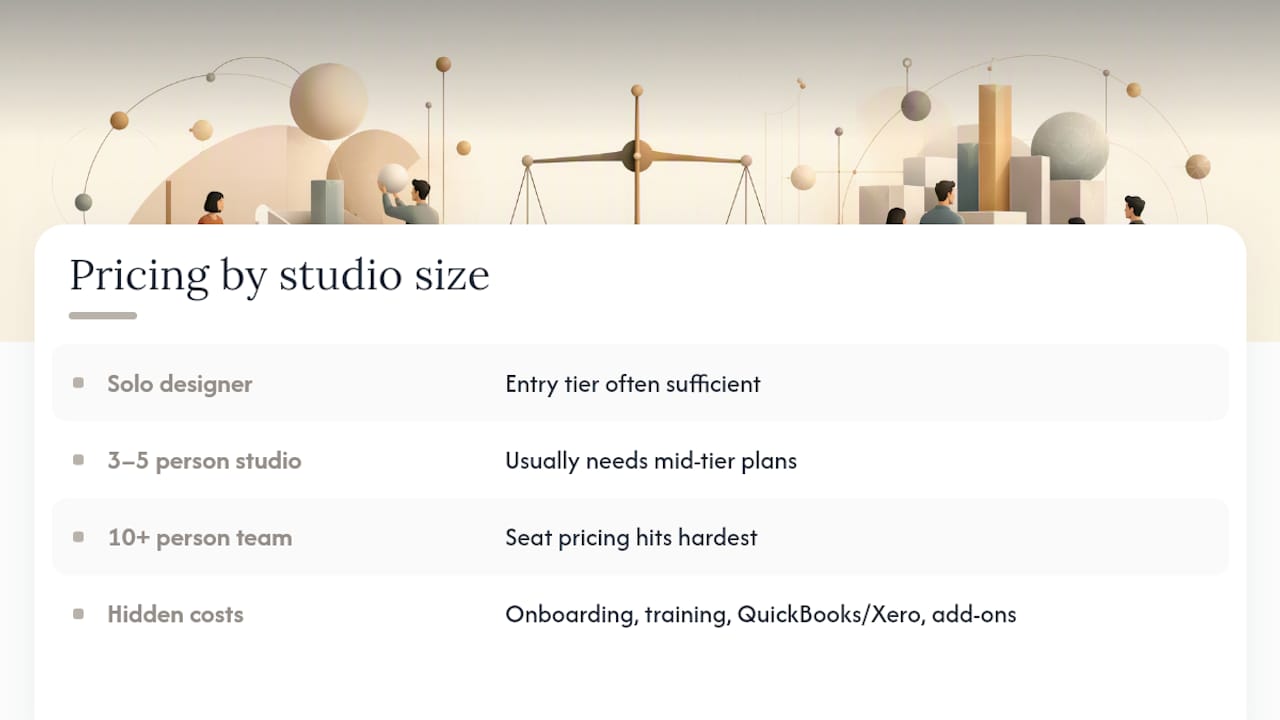
A solo designer running light procurement can often manage on an entry tier of a simpler tool like DesignFiles or Ivy, layering in a separate invoicing app if needed. A 3 to 5 person studio doing meaningful procurement usually needs the mid-tier plans on Studio Designer or Design Manager, where per-seat costs start compounding once you add a bookkeeper seat and a junior designer seat. A 10-plus person team is where seat-based pricing bites hardest. This is also where procurement-heavy studios most often justify the higher tiers, since the alternative is hiring extra bookkeeping hours to reconcile a lighter tool.
Hidden costs to model before signing anything: onboarding and training fees (both platforms offer paid tiers), a required QuickBooks or Xero subscription if the core platform doesn’t cover your GL needs, and any presentation add-on if your chosen platform is procurement-strong but design-tool-weak.
Pro Tip: Ask each vendor for their exact seat pricing at your projected headcount 12 months from now, not just today. Studios frequently discover the “affordable” tier becomes the most expensive line item on their software budget once they add two more seats.
Do these platforms replace QuickBooks or Xero?
Studio Designer and Design Manager both aim to be the accounting system of record, not a feeder into one. That means a full general ledger, accounts receivable and payable, and accrual tracking inside the platform itself, confirmed on Studio Designer’s own feature comparison page.
Most of the design-tool-first platforms, including Mydoma, DesignFiles, and HoneyBook, take the opposite approach: they handle invoicing and client billing, then expect you to export or sync into QuickBooks or Xero for real bookkeeping. That’s not a flaw, but it does mean two systems to reconcile monthly.
- Check whether reports export in a format your accountant can actually use without reformatting.
- Ask whether client-portal payments post automatically to the ledger or require manual entry.
Pro Tip: During any demo, ask the vendor to generate a project-level profit-and-loss statement live, on a real (or dummy) project. If they can’t do it in under two minutes, your bookkeeper will be doing it manually every month instead.
Which platform fits your studio’s size and workflow?
A solo designer with light procurement rarely needs Studio Designer’s or Design Manager’s full accounting depth. Ivy or DesignFiles usually covers invoicing and basic project tracking without the learning curve.
A 2 to 5 person boutique studio starts to feel the pinch of disconnected tools once procurement volume rises. This is the profile where Studio Designer’s item-level workflow earns its subscription cost, particularly for studios sourcing through trade showrooms and needing tight tracking from specification to delivery.

A 6 to 30 person mid-size firm generally needs the accounting autonomy both category leaders provide. Design Manager’s pre-loaded vendor catalogues save real time here if your studio works with a stable roster of suppliers.
Procurement-heavy commercial studios, the kind managing dozens of purchase orders per project, tend to outgrow generic tools like Notion or ClickUp entirely. Those platforms remain useful for internal task coordination but were never built to carry vendor sourcing or item-level accounting.
What do reviewers actually say about these tools?
Review patterns on Capterra’s Studio Designer listing and G2’s Design Manager page tell a consistent story: buyers accept a steeper learning curve in exchange for procurement and accounting depth they can’t get elsewhere.
- Praised most often: accounting granularity, item-level procurement tracking, and reliability once fully onboarded.
- Complained about most often: dated interface design, a training investment that takes weeks rather than days, and onboarding costs that surprise first-time buyers.
- Support patterns: both platforms offer structured, often paid, training packages rather than pure self-serve help, which reviewers flag as necessary rather than optional.
DesignFiles and Mydoma reviewers on G2 report the opposite trade-off: easier onboarding, weaker procurement depth.
How to choose: a checklist for vendor demos
Run this checklist before you sign anything, and don’t skip the live demo tasks.
- Map your procurement volume. Count purchase orders per month across your last three projects. If it’s under ten, a lighter tool may suffice; above that, accounting depth starts to matter more than presentation features.
- Ask for a live purchase order creation. Watch the vendor build one from scratch, not from a pre-populated demo file.
- Request a project-level profit and loss statement, generated on screen, not promised for “the next release.”
- Test the client portal approval flow end to end, including how a client-approved item updates your internal order status.
- Confirm data ownership and export rights in writing before signing a multi-year contract.
Watch for these red flags: a vendor who can’t export your full ledger on request, per-seat pricing that isn’t disclosed until late in the sales process, and onboarding fees quoted only after you’ve committed.
How does a trade showroom evaluate these platforms?
A working showroom cares less about interface polish and more about how fast a platform moves an item from specification to delivered product. From a showroom’s perspective, procurement speed and vendor access matter more than interface polish, because every hour lost to manual order tracking is an hour not spent with clients.
For studios visiting Faura, the practical advice is straightforward: trial the purchase order workflow first, not the presentation tools. A platform that struggles with vendor catalogues will struggle far more once you’re managing procurement across 200-plus curated brands.
Final recommendation: which one should you book a demo for?
Procurement-heavy studios and firms wanting native accounting should trial Studio Designer first. Mid-size firms with an established vendor roster and a need for pre-loaded catalogues should put Design Manager on the shortlist alongside it. Either way, run the demo test plan above before signing, and if your studio sources through a trade showroom, ask how Faura’s procurement support fits your final workflow.
- Book two demos, not one, and run identical test tasks on both.
- Confirm seat pricing at your 12-month headcount projection before comparing final costs.
Can you customise workflows, templates and reports?
Studio Designer allows custom fields and report templates tied to its item-level structure, so a profit-and-loss report can be filtered by project phase or vendor category without rebuilding it each time. Design Manager offers similar report customisation but structures it around its vendor catalogue and general ledger codes, which suits firms that already have a fixed chart of accounts.
Design-tool-first platforms like Mydoma and DesignFiles focus their customisation on presentation templates, moodboards and client-facing proposals rather than financial reporting. That’s a reasonable trade if your studio’s biggest workflow bottleneck is client presentations rather than procurement paperwork.
Generic tools including Monday.com, Asana, ClickUp, and Notion offer the deepest workflow customisation of any platform in this comparison, simply because they weren’t built for one industry. You can build any board, template or automation you want. The cost is that none of it understands a purchase order, a vendor catalogue, or a client approval flow natively. Every workflow has to be built from scratch, and every report has to be manually connected to your actual accounting system.
For most studios, the right question isn’t which platform offers more customisation in the abstract. It’s whether the customisation you need sits in reporting and procurement (favouring Studio Designer or Design Manager) or in project collaboration and internal process (favouring the generic tools, paired with a lighter invoicing app).
How do their data security and privacy policies compare?
Both Studio Designer and Design Manager operate as hosted platforms handling sensitive client financial data, vendor pricing, and project specifications, which makes data handling a genuine due-diligence item rather than a formality.
Security documentation varies between vendors, so the practical approach is to ask directly during the sales process: request their data retention policy, ask who owns exported data if you cancel, and confirm whether client payment information is tokenised through a third-party processor rather than stored directly on the platform.
The same due diligence applies to the wider category. HoneyBook and Houzz Pro process client payments directly, which means their payment security practices deserve the same scrutiny you’d apply to any platform touching card data. Generic tools like Notion, Monday.com, Asana, and ClickUp typically offer more mature, publicly documented enterprise security programmes, simply because they serve a far broader customer base with stricter compliance demands. That’s a genuine advantage for internal task data, but it doesn’t extend to financial or procurement data those tools were never designed to hold.
Ask every vendor the same three questions: where is data hosted, who can access it, and what happens to it if you leave.
Do Studio Designer and Design Manager have mobile apps?
Mobile access matters most for on-site work: checking a purchase order status during a client walkthrough, or approving an invoice from a supplier meeting. Neither Studio Designer nor Design Manager has built its reputation primarily around mobile app depth. Studio Designer offers a mobile app and both can be used on a tablet, but neither is positioned as a mobile-first platform the way some newer entrants are.
Houzz Pro, by contrast, has invested more visibly in mobile functionality, largely because its lead-generation model depends on designers responding quickly to client enquiries from anywhere. Mydoma and HoneyBook also lean toward mobile-friendly client communication, since their core value proposition centres on client experience rather than back-office procurement.
If your studio’s day-to-day work happens mostly at desks, reviewing purchase orders and reconciling accounts, the web-based depth of Studio Designer or Design Manager matters more than mobile polish. If your team is frequently on client sites or at trade showrooms checking specifications in real time, weigh mobile usability more heavily before committing, and ask specifically to trial the mobile experience rather than assuming feature parity with the desktop version.
A practitioner’s honest take
Procurement depth wins the accounting argument every time, but it rarely wins the daily-use argument. The best studios trial both, then keep whichever one their bookkeeper stops complaining about first.
Where Faura fits into your procurement workflow
Whichever platform you choose, the software still can’t source the physical product for you. Faura is a trade showroom that can help close the gap between specifying an item in Studio Designer or Design Manager and getting it delivered, with access to over 200 brands under one roof in Westminster.

Studios can visit Faura to validate their procurement workflow in practice, not just on paper: pulling samples, confirming lead times, and testing vendor relationships before committing to a purchase order in whichever platform they’ve chosen. Faura treats designers as clients rather than as trade accounts to process, with trade terms built around how studios actually work. If your next step is tightening the gap between specification and delivery, book a showroom visit and see how the sourcing side of your workflow could run.
Frequently asked questions
Is Studio Designer better than Design Manager for a small studio? For a small studio with light procurement, neither may be necessary; DesignFiles or Ivy often suffices. Once procurement volume rises, Studio Designer’s item-level structure tends to suit smaller teams better than Design Manager’s catalogue-heavy approach.
Does Design Manager work without QuickBooks? Yes. Design Manager includes a standalone general ledger, so studios can run accounts receivable, payable, and reporting without a separate QuickBooks subscription.
How does Houzz Pro compare to Studio Designer for procurement? Houzz Pro focuses on lead generation and client sourcing rather than item-level procurement depth, according to Capterra’s Houzz Pro reviews. Studios needing detailed purchase order tracking typically find Studio Designer stronger on that front.
Can generic tools like Notion or ClickUp replace Studio Designer? They can handle internal project tasks well, but none offer native vendor catalogues, item-level procurement, or interior-design-specific accounting, so most studios pair them with a separate invoicing or accounting tool.
Sources
- Capterra — Studio Designer
- G2 — Design Manager reviews
- Studio Designer — official site
- Knowlix — Studio Designer alternative
- ASID — 2025 state of interior design report